
I wanted a way for people (recruiters, hiring managers, teammates… and honestly, even me) to ask questions about my work and get a grounded, accurate answer, based on my actual resume, project write-ups, blog posts, and other various career related docs.
So I built Ask Elliott-AI: a Retrieval-Augmented Generation (RAG) agent that answers questions specifically about Bryan Elliott (Senior Software Engineer), my skills, projects, and professional career, by retrieving relevant context from a Supabase vector database and using an OpenAI model to generate a response.
This post walks through the full build: data pipeline, chunking, embeddings, vector storage, retrieval, and finally an API endpoint that streams responses into a simple HTML + vanilla JS chat UI.
You can check it out live on my Dev Portfolio website. Play with it! Ask it anything you would like to know about me, my career, skills, experience, projects, etc.!
Also, the project code is open source and publicly available on GitHub at: https://github.com/elliottprogrammer/ask-elliott-ai

What I Wanted (and What I Didn’t)
Goals
- Answers should be grounded in my real documents, not generic fluff.
- Easy to update: I can add additional documents and re-index.
- A clean developer workflow: run locally, deploy to Netlify, works on my portfolio site.
- Streaming responses (feels fast + modern).
Non-goals
- No heavy frontend frameworks needed (I used plain HTML/CSS/JS).
- No complex orchestration platform. I wanted a “small and sharp” RAG stack.
Project Structure
At a high level, I kept the project simple:
- elliott-ai/documents/: Contains 8 files (resume-style content, project highlights, work samples, about-me content, etc.)
- elliott-ai/chunk-files.mjs: One-time (or re-runnable) script that:
- Loads and reads the document files
- Chunk/splits them
- Creates vector embeddings (explained below)
- Inserts them into a Supabase vector database
- elliott-ai/query-vector-store.mjs: Retrieval + answering logic:
- Embed the user question
- Retrieve top matching chunks
- Construct context
- Call the LLM to answer, providing the most relevant context.
- Support streaming
- /api/elliott-ai.js: An API endpoint function that:
- Receives { question }
- Calls the Elliott-AI agent
- Streams the answer back over SSE (Server-Sent Events)
- index.html, styles.css, main.js: A lightweight chat UI embedded into my site.
The Data Layer: Supabase Vector Store
I created a Supabase database and set up with a public.documents table that stores:
- content (text chunk)
- embedding (vector)
- metadata (jsonb)
- created_at
Table definition (simplified):
create table documents (
  id int8 primary key default not null,
  content text not null,
  embedding vector(1536),
  metadata jsonb,
  created_at timestamptz default now()
);
And a database function called 'match_documents‘ for similarity search:
select
  content,
  metadata,
  1 - (embedding <=> query_embedding) as similarity
from documents
order by embedding <=> query_embedding
limit match_count;That gave me the core building block: “given an embedding, return the closest chunks.”
What are “Embeddings”, you ask?
Humans communicate with words, but computers ultimately communicate with math and numbers. This creates a fundamental problem. For example, how does a computer understand which of these are similar or not?
sentance1 = "A rabbit jumped over the stick."
sentance2 = "The bunny hopped over a twig."
sentance3 = "It was a sunny day."To a computer, these are just text characters… Strings.
But to humans, we know that sentences 1 and 2 are very similar in their meaning.
Embeddings convert text into multi-dimensional numerical vectors that capture semantic meaning.
The more similar the vector’s values, the closer the semantic meaning. For example:
# Conceptual representation
"rabbit" → [0.3, -0.2, 0.8, 0.3, ...]       # 284 numbers
"bunny" → [0.29, -0.21, 0.82, 0.33, ...]    # also 284 numbers, values very similar!
"sunny" → [-0.1, 0.9, -0.2, 0.7, ...] # 312 numbers - Different amount of numbers, and values are very different.So you can see, embeddings allow the computer to give semantic meaning to words and find conceptual relationships.
Step 1: Chunking + Embedding My Documents
Raw documents (i.e.- PDF’s, MS Word docs, & markdown files) are too big and too messy to embed as-is. RAG works best when you:
- Split content into meaningful chunks.
- Embed each chunk.
- Store chunk metadata so you can trace answers back to source docs.
My chunking approach
I went with a recursive, token-aware chunking strategy.
Why token-aware?
Because LLM context windows and embedding limits are token-based, not character-based. Token-aware chunking helps prevent huge chunks and keeps retrieval consistent.
In chunk-files.mjs, the pipeline is basically:
- Read each document file.
- Split into chunks (recursive strategy).
- Compute the embeddings (1536-dim model).
- Store chunk content + embedding + metadata in a Supabase DB.
After running:
node elliott-ai/chunk-files.mjs…I ended up with 36 chunks in my Supabase table. That’s just to start with, for now… I started with only 8 documents. I will be adding more documents in the near future, resulting in many more chunks, each chunk being a searchable row in the database.
Step 2: Retrieval + Answering (The Real “Agent” Part)
The heart of Elliott-AI is:
- Embed the user’s question.
- Retrieve top matches via
match_documents(the database function described in the ‘Data Layer’ section above). - (Optional) I blended in keyword-based matches for a lightweight hybrid approach.
- Build a context block (bounded by token budget)
- Ask the model to answer using only that context
A simplified mental model:
Question → embedding → retrieve chunks → context → answer
This is what turns a general-purpose LLM into a “Bryan Elliott–specific” RAG AI agent.
Hybrid keyword + vector search (lightweight version)
Vector similarity is amazing, but keywords still matter.
Especially for:
- Exact tool names (React, TypeScript, Supabase, Jetpack, etc.)
- Project names
- Company names
- Acronyms
So I added a simple “hybrid” layer:
- Vector retrieval gives the best semantic matches.
- Keyword scoring helps boost exact matches.
- Results are deduped + sorted.
This improved reliability for queries like:
- “What frontend stacks has Bryan used recently?”
- “Which projects were built using PHP?”
- “What did Bryan ship at Automattic?”
Step 3: Moving From CLI to API Endpoint with a Streaming Response
Initially, I tested via the command line:
node elliott-ai/query-vector-store.mjs "What front-end stacks has Bryan used recently?"But the end goal was a real UX: a chat box on my portfolio site.
So I created an HTTP API endpoint with an SSE streaming response, that could be called from the AI chat box UI in the elliottprogrammer.com frontend (My dev portfolio site).
Why streaming?
Streaming makes the UI feel instant. Even if the response takes a few seconds, users see text appear immediately, token-by-token, and honestly it’s what users expect from an AI agent.
Step 4: Vanilla JS Chat UI (No Frameworks)
On the frontend, I added:
- A chat log area (containing assistant & user chat bubbles)
- An input box + submit button
- Streaming rendering logic
The browser sends:
fetch("/api/elliott-ai", {
  method: "POST",
  headers: { "Content-Type": "application/json" },
  body: JSON.stringify({ question })
})Then reads the SSE stream and appends tokens as they arrive.
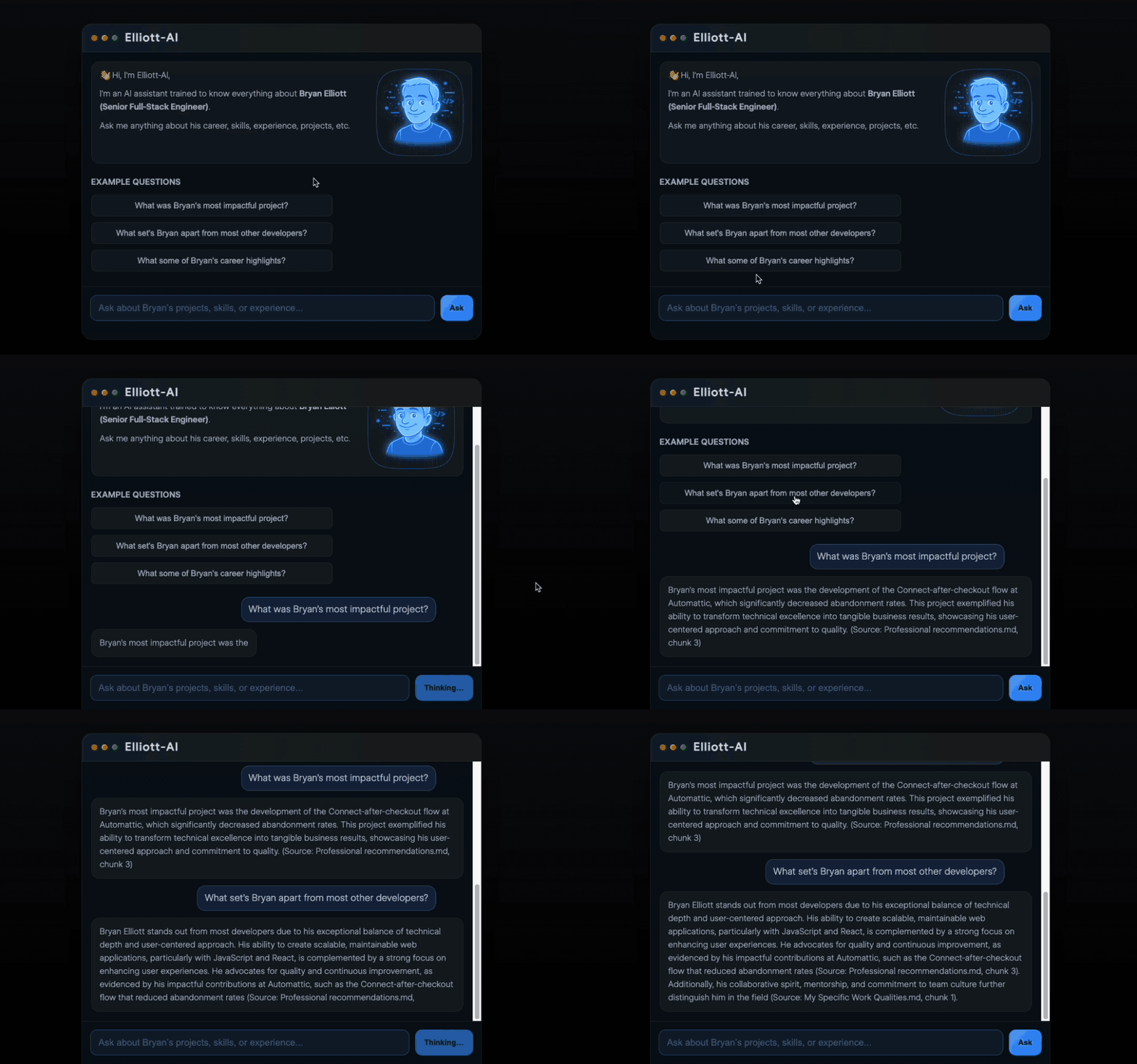
The Result: a fully working “Ask Elliott-AI” section on my site. It’s simple, lightweight, and fast.
What I Like About This Setup
- Grounded answers: It’s not guessing; it’s quoting my own factual career docs.
- Easy updates: Add more (or edit) documents → re-run chunk script → redeploy.
- Fast retrieval: The Supabase vector search is simple and effective.
- Portfolio-friendly: This is a real feature/tool people can interact with and get very useful information.
What I’ll Improve Next
If I keep iterating, here’s what I’ll likely add:
- Metadata filtering
- Example: limit queries to only “projects” docs or only “resume” docs.
- Better hybrid search
- True Postgres full-text search (FTS) plus vector search in one ranked query.
- Conversation memory
- Store chat history (in Netlify Blobs or Supabase) so follow-ups work better.
- Eval harness
- A small test suite of questions to measure answer quality after updates.
Final Thoughts
Elliott-AI started as a practical experiment: “Can I make an AI chat bot that answers questions about me and my work… accurately?”
But it turned into something bigger:
- A clean example of modern RAG architecture (without over-engineering it).
- A living, searchable knowledge base of my career.
- An awesome learning experience that I can take to my place of employment, or for future projects.
If you’re building a personal brand as an engineer, I genuinely think projects like this are a superpower: they show not only what you’ve done, but how you think, and how you build.
Next, I’ll be learning and developing a project related to “AI agents with tool calling“. Stay tuned!